TikTok Fonts — 48+ Best Styles (2026) | StylishText
TikTok reads captions, bios, and comments as plain Unicode text, which means the bold, italic, and bubble-letter effects below paste in and display exactly as you see them here — no app, filter, or special font installation required. The tool on this page lets you type once and get every style back instantly, with a ready-made result already filled in below so you can see the effect before you touch a key.
Fancy TikTok fonts work because of a quirk in the Unicode standard: alongside the plain A-Z letters your keyboard types, Unicode reserves separate blocks of lookalike characters — the Mathematical Alphanumeric Symbols block (used for the bold, italic, double-struck, and Fraktur styles here) and the Enclosed Alphanumerics block (used for circled letters). Each “styled A” is a genuinely different character with its own code point, not a font effect layered on top of the regular letter. That is exactly why copying a styled word and pasting it into TikTok’s caption box, bio field, or a comment keeps the style intact: TikTok’s text field doesn’t know or care which block a character came from, it just renders whatever Unicode code point it receives.
Try the generator
A–Z reference table (Bold)
If you want to build your own combination instead of using a premade style, this table shows exactly which bold character maps to each letter and digit, along with its Unicode code point so you can verify it in any Unicode lookup tool.
| Letter | Upper | Lower |
|---|---|---|
| A | 𝐀 U+1D400 |
𝐚 U+1D41A |
| B | 𝐁 U+1D401 |
𝐛 U+1D41B |
| C | 𝐂 U+1D402 |
𝐜 U+1D41C |
| D | 𝐃 U+1D403 |
𝐝 U+1D41D |
| E | 𝐄 U+1D404 |
𝐞 U+1D41E |
| F | 𝐅 U+1D405 |
𝐟 U+1D41F |
| G | 𝐆 U+1D406 |
𝐠 U+1D420 |
| H | 𝐇 U+1D407 |
𝐡 U+1D421 |
| I | 𝐈 U+1D408 |
𝐢 U+1D422 |
| J | 𝐉 U+1D409 |
𝐣 U+1D423 |
| K | 𝐊 U+1D40A |
𝐤 U+1D424 |
| L | 𝐋 U+1D40B |
𝐥 U+1D425 |
| M | 𝐌 U+1D40C |
𝐦 U+1D426 |
| N | 𝐍 U+1D40D |
𝐧 U+1D427 |
| O | 𝐎 U+1D40E |
𝐨 U+1D428 |
| P | 𝐏 U+1D40F |
𝐩 U+1D429 |
| Q | 𝐐 U+1D410 |
𝐪 U+1D42A |
| R | 𝐑 U+1D411 |
𝐫 U+1D42B |
| S | 𝐒 U+1D412 |
𝐬 U+1D42C |
| T | 𝐓 U+1D413 |
𝐭 U+1D42D |
| U | 𝐔 U+1D414 |
𝐮 U+1D42E |
| V | 𝐕 U+1D415 |
𝐯 U+1D42F |
| W | 𝐖 U+1D416 |
𝐰 U+1D430 |
| X | 𝐗 U+1D417 |
𝐱 U+1D431 |
| Y | 𝐘 U+1D418 |
𝐲 U+1D432 |
| Z | 𝐙 U+1D419 |
𝐳 U+1D433 |
| 0 | 𝟎 U+1D7CE |
|
| 1 | 𝟏 U+1D7CF |
|
| 2 | 𝟐 U+1D7D0 |
|
| 3 | 𝟑 U+1D7D1 |
|
| 4 | 𝟒 U+1D7D2 |
|
| 5 | 𝟓 U+1D7D3 |
|
| 6 | 𝟔 U+1D7D4 |
|
| 7 | 𝟕 U+1D7D5 |
|
| 8 | 𝟖 U+1D7D6 |
|
| 9 | 𝟗 U+1D7D7 |
|
Ready-to-use TikTok bio and caption examples
Nickname styles
A few names styled across three different Unicode families, so you can see how the same letters look in bold, italic, and Fraktur before picking a style for your own name in the tool above.
Name frames and decorative combos
These wrap a bold version of a sample name in symbol pairs — useful for a display name or a pinned comment signature. Type your own name into the tool above, copy the bold result, then paste it between the frame symbols below.
Kaomoji and emoji combos
Where these styles actually display on TikTok
| Location | Styled Unicode text | Notes |
|---|---|---|
| Caption (video post) | Displays correctly | Plain Unicode, no markdown support needed |
| Bio | Displays correctly | Subject to TikTok’s bio character limit, see below |
| Comments | Displays correctly | Subject to the comment character limit, see below |
| Display name | Displays correctly | Subject to the display name limit, see below |
| Username (@handle) | Not supported | TikTok usernames are restricted to plain letters, numbers, underscores, and periods — styled Unicode characters are rejected at signup |
TikTok’s character limits — what we could and couldn’t confirm
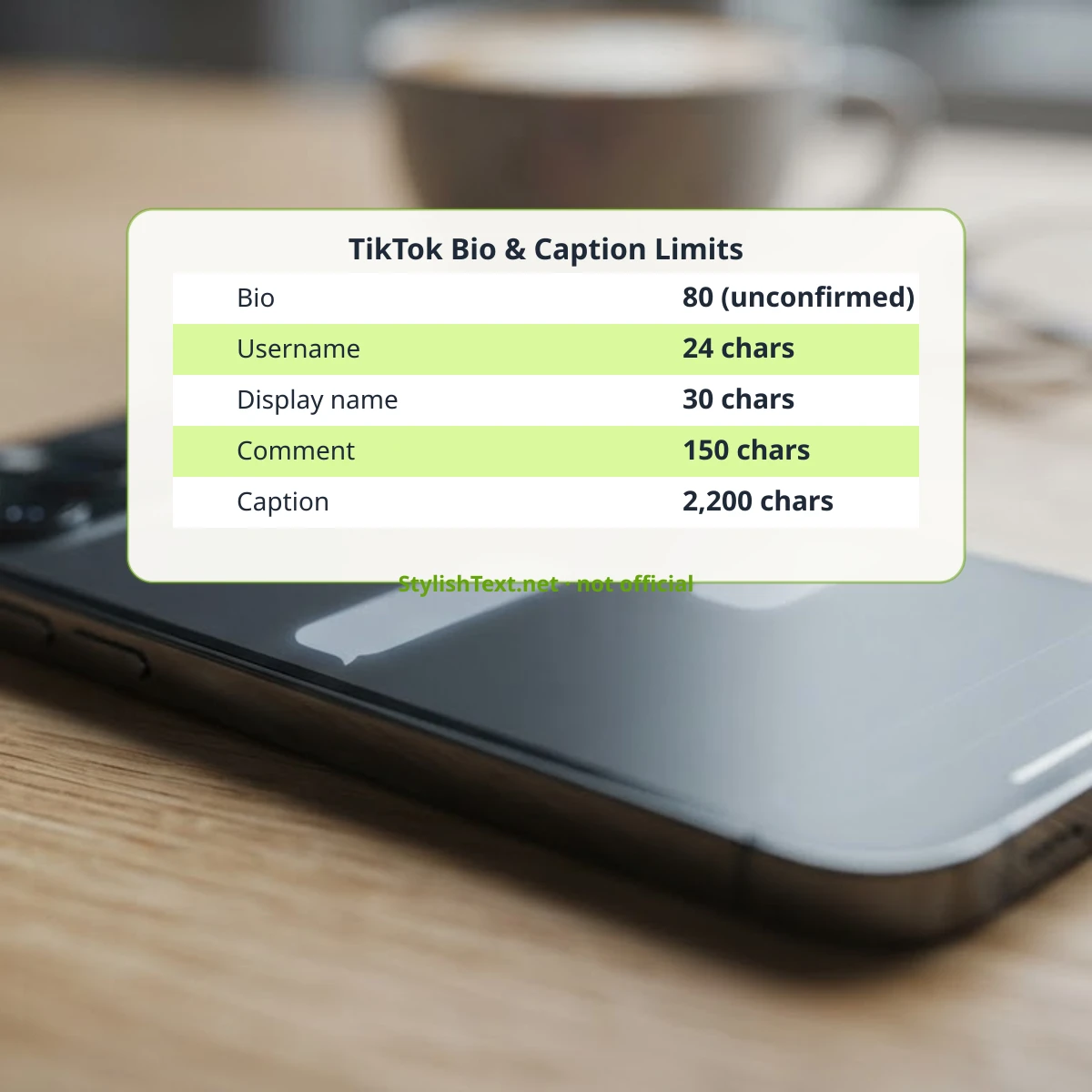
We checked TikTok’s official Help Center (help.tiktok.com) on 20 Oct 2026 looking for a published, dated page listing exact character-count limits for bios, display names, usernames, comments, and captions. We could not find an official TikTok Help Center article that states these numbers directly. What follows is what third-party sources commonly report, with the disagreement between sources shown honestly rather than picked at random:
- Bio: most third-party sources cite 80 characters; a smaller number of more recent sources claim TikTok raised this to 160 for some accounts. We have not independently confirmed either figure against an official source.
- Username (@handle): most sources say 24 characters; at least one source claims 30. Not independently confirmed.
- Display name: sources consistently cite 30 characters, with more agreement here than on the other limits, but still no official citation found.
- Comments: sources consistently cite 150 characters.
- Captions: most sources cite 2,200 characters; we also saw an unverified claim of a 4,000-character limit on some posting flows, which we could not confirm.
Because none of these are backed by an official, citable TikTok page as of our 20 Oct 2026 check, treat them as practical planning estimates rather than guaranteed limits — if your bio or caption gets cut off, TikTok’s live character counter in the posting flow is the only number you should actually trust.
Real font coverage: why some styles may show boxes on older phones
Every style above comes from a specific Unicode block, and whether a character renders as the intended glyph or as a blank box (“tofu”) depends on whether the viewer’s device has a font installed that covers that block. We checked this directly using fontTools against the font files actually installed on this server, rather than guessing:
| Style family | Coverage in a base system font (Noto Sans) | Coverage in a dedicated symbols/math font |
|---|---|---|
| Bold / Italic / Bold Italic / Sans Bold | 0% — not in the base font’s cmap | 100% in Noto Sans Math |
| Double-struck / Fraktur | 0% — not in the base font’s cmap | 100% in Noto Sans Math |
| Monospace | 0% — not in the base font’s cmap | 100% in Noto Sans Math |
| Circled | Partial in DejaVu Sans; stronger coverage in Noto Sans Symbols | 100% in Noto Sans Symbols |
In practice, most modern phones (recent iOS and Android releases) ship a system font stack that includes a math/symbols fallback font, so these styles display correctly on the large majority of devices people use to browse TikTok. Checked with fontTools 4.60.2 against installed system font files on 20 Oct 2026; method documented rather than claimed from memory.
Accessibility and SEO note
Screen readers generally announce each styled Unicode character individually by its Unicode name rather than reading the word naturally — a bold “A” may be announced differently than a plain “A” depending on the screen reader and its pronunciation dictionary. For a caption or bio meant to be read by everyone, including TikTok’s own auto-captioning and accessibility tools, keep the core message in plain text and reserve a styled word for decorative emphasis only, not for information a reader actually needs.
FAQ
Will my styled TikTok bio get flagged or hidden?
No — these are standard Unicode characters, the same character set TikTok already supports for emoji and non-Latin alphabets. They display normally and are not treated as spam or prohibited content by themselves.
Can I use these styles in my TikTok username?
No. TikTok restricts usernames (the @handle) to plain letters, numbers, underscores, and periods. Styled Unicode characters are only usable in your display name, bio, captions, and comments.
Why does my styled text look like boxes on some phones?
Your device doesn’t have a font installed that covers that Unicode block. This is rare on modern phones but can happen on older devices or certain browsers — see the font-coverage table above.
Does TikTok support markdown like **bold** in captions?
No. Unlike Discord or WhatsApp, TikTok has no native text-formatting markup — typing asterisks or underscores around a word just shows the literal asterisks. The only way to get bold-looking text on TikTok is pasting pre-styled Unicode characters like the ones generated above.
Share what you made
If you found a combination that looks great on your TikTok profile, or spotted a style that doesn’t render right on your device, let us know in the comments below — real device reports help keep the coverage notes above accurate.
Share your result or suggest a fix
Tested a style on a device or app we have not listed above? Tell us what you found (include the app, device and date) and we will review it before it is shown here.